It is easy to wirelessly sync iCal and Address Book with iPhone. Just follow the simple steps below.
Birthdays and public holidays can also be wirelessly synced to your iPhone.
Required:
- Export Google Calendar: http://www.google.com/support/calendar/bin/answer.py?hl=en&answer=37111
- Export Address Book: http://support.apple.com/kb/HT2980#abc (Or File > Export > Address Book Archive)- Export iCal: http://support.apple.com/kb/HT2980#icc (Or File > Export > iCal Archive)
Your Google Calendar will now appear in iCal's list of calendars, and changes you make to your Google Calendar in iCal will be reflected when you sign in to Google Calendar.
Event information will automatically refresh every five minutes. You can change this interval by opening the iCal > Preferences > Accounts menu and selecting a new refresh interval under the 'Refresh calendars' drop-down. Keep in mind you can also force a refresh by selecting a calendar and pressing the Apple and R keys at the same time.
Calendars that are checked but disabled have already been added to iCal - you can remove them from
within iCal.
Taken directly from http://www.google.com/support/calendar/bin/answer.py?hl=en&answer=99358#ical

For detailed information of what can be synced, and other information, visit http://google.com/support/contactsync/?hl=en.
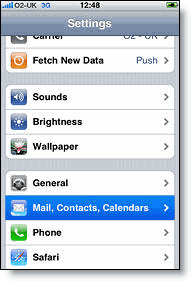
2. Open Mail, Contacts, Calendars.
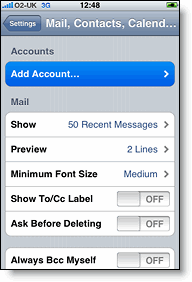
3. Tap Add Account....
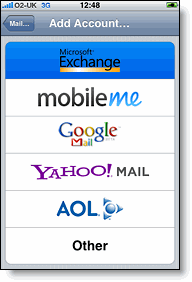
4. Select Microsoft Exchange.
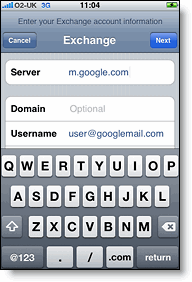
6. Leave the Domain field blank.
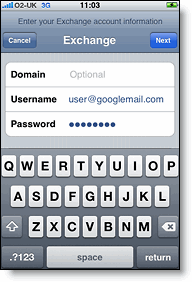
7. Enter your full Google Account email address as the Username.
8. Enter your Google Account password as the Password.
9. Tap Next at the top of your screen.
9a. Choose Accept if the Unable to Verify Certificate dialog appears.
10. When the new Server field appears, enter m.google.com.
11. Press Next at the top of your screen again.
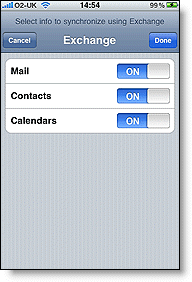
12. Select the Google services you want to sync.
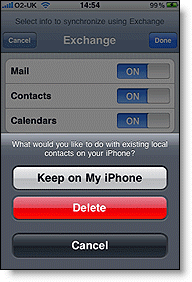
13. Unless you want to delete all the existing Contacts and Calendars on your phone, select the Keep on my iPhone option when prompted. This will also allow you to keep syncing with your computer via iTunes.
If you want to sync only the My Contacts group, you must choose to Delete Existing Contacts during the Google Sync install when prompted. If you choose to keep existing contacts, it will sync the contents of the "All Contacts" group instead.
You've set up Google Sync for your iPhone. Synchronization will begin automatically if you have Push enabled on your phone. You can also open the Mail, Calendar or Contacts app and wait a few seconds to start a sync. Or you can manually press the ‘sync now’ button from the Apple menu.
Birthdays and public holidays can also be wirelessly synced to your iPhone.
Required:
- Gmail account (Free from http://mail.google.com/)
- iPhone OS version 3.0 and later
- Mac OS X 10.6 and later
- iCalBirthdays 1.7.1 (for syncing birthdays)
- Use iTunes to sync your iCal calendar and Address Book with your iPhone (to ensure you have the latest data synced)
- Backup your Address Books (both Mac and Gmail Contacts) and Calendars (both iCal and Google Calendar)
- Export Google Calendar: http://www.google.com/support/calendar/bin/answer.py?hl=en&answer=37111
- Export Address Book: http://support.apple.com/kb/HT2980#abc (Or File > Export > Address Book Archive)- Export iCal: http://support.apple.com/kb/HT2980#icc (Or File > Export > iCal Archive)
How To Wirelessly Sync iCal with iPhone
There are two steps to wirelessly syncing iCal with iPhone. These are:- Sync iCal with Google Calendar
- Sync Google Calendar with iPhone
Sync iCal with Google Calendar
To set up CalDAV support for Google Calendar in Apple's iCal, follow these steps:- Open Apple iCal, go to Preferences and then the Accounts tab.
- Click on the + button to add an account.
- Under Account Information, enter your Google Account username and password.
- Under Server Options, add the following URL:
https://www.google.com/calendar/dav/YOUREMAIL@DOMAIN.COM/user
Replace 'youremail@domain.com' with the email address that you use to log in to Calendar. Make sure to include the '@domain.com' portion (which is @gmail.com for Gmail users) in this section. - Click Add.
- Under the Delegation tab, select the calendars you'd like to add to iCal by checking the boxes next to them. You may need to hit refresh to get the latest list of calendars.
- Add your email address to your Address Book card by selecting Add Email. You'll be prompted to add your email address only if your address is not already in your Address Book.
Your Google Calendar will now appear in iCal's list of calendars, and changes you make to your Google Calendar in iCal will be reflected when you sign in to Google Calendar.
Event information will automatically refresh every five minutes. You can change this interval by opening the iCal > Preferences > Accounts menu and selecting a new refresh interval under the 'Refresh calendars' drop-down. Keep in mind you can also force a refresh by selecting a calendar and pressing the Apple and R keys at the same time.
Calendars that are checked but disabled have already been added to iCal - you can remove them from
within iCal.
Taken directly from http://www.google.com/support/calendar/bin/answer.py?hl=en&answer=99358#ical
Sync Google Calendar with iPhone
Please refer to ‘Sync Google Calendar, Contacts and Mail with iPhone’ below.How To Wirelessly Sync Address Book with iPhone
There are two steps to wirelessly syncing iCal with iPhone. These are:- Sync Address Book with Gmail Contacts
- Sync Gmail Contacts with iPhone
Sync Address Book with Gmail Contacts
- Open Address Book, go to Preferences and then the Accounts tab.
- Click on the Synchronize with Google checkbox and Configure button.
- Enter your Google Account (Google email address) and Password and click OK.

For detailed information of what can be synced, and other information, visit http://google.com/support/contactsync/?hl=en.
Sync Gmail Contacts with iPhone
Please refer to ‘Sync Google Calendar, Contacts and Mail with iPhone’ below.Sync Google Calendar, Contacts and Mail with iPhone
Google Sync is only supported on iPhone OS versions 3.0 and above. You can check your current version by going to Settings > General > About > Version. To upgrade, follow the instructions at http://www.apple.com/iphone/softwareupdate/. Please upgrade to iPhone OS 3.0 before setting up Google Sync.Getting Started:
1. Open the Settings application on your device's home screen.2. Open Mail, Contacts, Calendars.
3. Tap Add Account....
4. Select Microsoft Exchange.
Enter Account Info
5. In the Email field, enter your full Google Account email address. If you use an @googlemail.com address, you may see an "Unable to verify certificate" warning when you proceed to the next step.6. Leave the Domain field blank.
7. Enter your full Google Account email address as the Username.
8. Enter your Google Account password as the Password.
9. Tap Next at the top of your screen.
9a. Choose Accept if the Unable to Verify Certificate dialog appears.
10. When the new Server field appears, enter m.google.com.
11. Press Next at the top of your screen again.
12. Select the Google services you want to sync.
13. Unless you want to delete all the existing Contacts and Calendars on your phone, select the Keep on my iPhone option when prompted. This will also allow you to keep syncing with your computer via iTunes.
If you want to sync only the My Contacts group, you must choose to Delete Existing Contacts during the Google Sync install when prompted. If you choose to keep existing contacts, it will sync the contents of the "All Contacts" group instead.
You've set up Google Sync for your iPhone. Synchronization will begin automatically if you have Push enabled on your phone. You can also open the Mail, Calendar or Contacts app and wait a few seconds to start a sync. Or you can manually press the ‘sync now’ button from the Apple menu.

Should you want to setup more of an advanced, closer to real-time, sync, you may like to follow the instructions at http://blog.kunugiken.com/?p=236.
How To Wirelessly Sync Birthdays with iPhone
- Download and install iCalBirthdays 1.7.1 (downloadable from http://www.apple.com/downloads/macosx/automator/icalbirthdays.html)
- Open the Automator application (from the applications root directory) and setup accordingly.
- The iCal Calendar Name must be named the same as your Google Calendar connection (ie. your gmail email address, eg. yourname@gmail.com)
- One must first copy their current iCal appointments (using iCal) from their synced Google Account
to another account, as the iCalBirthday app overwrites the iCal calendar when it transfers birthdays to it. And then the appointments can be copied back to the synced Google Account after the birthdays have been transferred. (As I did not have many appointments, I copied these manually, but if you have many appointments, you may like to explore a more automated method.)


