If you haven't already heard, Tony Robbins is holding his 'Unleash The Power Within' event in Sydney, Australia from 4-7 March 2011.
Full details of this event are available at www.unleashthepowerwithin.net.au.
Wednesday, September 29, 2010


Monday, February 15, 2010
How To Wirelessly Sync iCal and Address Book with iPhone (for FREE)
It is easy to wirelessly sync iCal and Address Book with iPhone. Just follow the simple steps below.
Birthdays and public holidays can also be wirelessly synced to your iPhone.
Required:
- Export Google Calendar: http://www.google.com/support/calendar/bin/answer.py?hl=en&answer=37111
- Export Address Book: http://support.apple.com/kb/HT2980#abc (Or File > Export > Address Book Archive)- Export iCal: http://support.apple.com/kb/HT2980#icc (Or File > Export > iCal Archive)
Your Google Calendar will now appear in iCal's list of calendars, and changes you make to your Google Calendar in iCal will be reflected when you sign in to Google Calendar.
Event information will automatically refresh every five minutes. You can change this interval by opening the iCal > Preferences > Accounts menu and selecting a new refresh interval under the 'Refresh calendars' drop-down. Keep in mind you can also force a refresh by selecting a calendar and pressing the Apple and R keys at the same time.
Calendars that are checked but disabled have already been added to iCal - you can remove them from
within iCal.
Taken directly from http://www.google.com/support/calendar/bin/answer.py?hl=en&answer=99358#ical

For detailed information of what can be synced, and other information, visit http://google.com/support/contactsync/?hl=en.
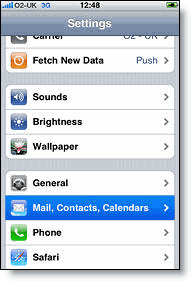
2. Open Mail, Contacts, Calendars.
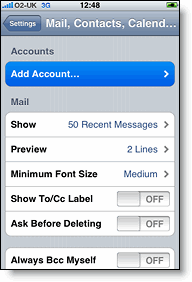
3. Tap Add Account....
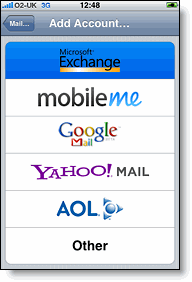
4. Select Microsoft Exchange.
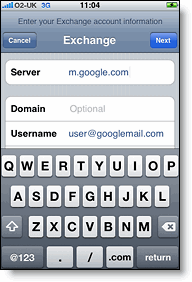
6. Leave the Domain field blank.
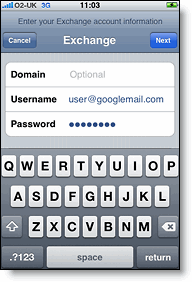
7. Enter your full Google Account email address as the Username.
8. Enter your Google Account password as the Password.
9. Tap Next at the top of your screen.
9a. Choose Accept if the Unable to Verify Certificate dialog appears.
10. When the new Server field appears, enter m.google.com.
11. Press Next at the top of your screen again.
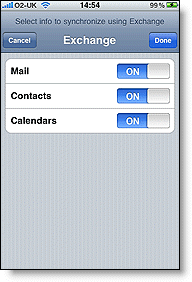
12. Select the Google services you want to sync.
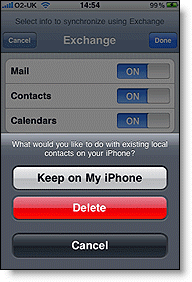
13. Unless you want to delete all the existing Contacts and Calendars on your phone, select the Keep on my iPhone option when prompted. This will also allow you to keep syncing with your computer via iTunes.
If you want to sync only the My Contacts group, you must choose to Delete Existing Contacts during the Google Sync install when prompted. If you choose to keep existing contacts, it will sync the contents of the "All Contacts" group instead.
You've set up Google Sync for your iPhone. Synchronization will begin automatically if you have Push enabled on your phone. You can also open the Mail, Calendar or Contacts app and wait a few seconds to start a sync. Or you can manually press the ‘sync now’ button from the Apple menu.
Birthdays and public holidays can also be wirelessly synced to your iPhone.
Required:
- Gmail account (Free from http://mail.google.com/)
- iPhone OS version 3.0 and later
- Mac OS X 10.6 and later
- iCalBirthdays 1.7.1 (for syncing birthdays)
- Use iTunes to sync your iCal calendar and Address Book with your iPhone (to ensure you have the latest data synced)
- Backup your Address Books (both Mac and Gmail Contacts) and Calendars (both iCal and Google Calendar)
- Export Google Calendar: http://www.google.com/support/calendar/bin/answer.py?hl=en&answer=37111
- Export Address Book: http://support.apple.com/kb/HT2980#abc (Or File > Export > Address Book Archive)- Export iCal: http://support.apple.com/kb/HT2980#icc (Or File > Export > iCal Archive)
How To Wirelessly Sync iCal with iPhone
There are two steps to wirelessly syncing iCal with iPhone. These are:- Sync iCal with Google Calendar
- Sync Google Calendar with iPhone
Sync iCal with Google Calendar
To set up CalDAV support for Google Calendar in Apple's iCal, follow these steps:- Open Apple iCal, go to Preferences and then the Accounts tab.
- Click on the + button to add an account.
- Under Account Information, enter your Google Account username and password.
- Under Server Options, add the following URL:
https://www.google.com/calendar/dav/YOUREMAIL@DOMAIN.COM/user
Replace 'youremail@domain.com' with the email address that you use to log in to Calendar. Make sure to include the '@domain.com' portion (which is @gmail.com for Gmail users) in this section. - Click Add.
- Under the Delegation tab, select the calendars you'd like to add to iCal by checking the boxes next to them. You may need to hit refresh to get the latest list of calendars.
- Add your email address to your Address Book card by selecting Add Email. You'll be prompted to add your email address only if your address is not already in your Address Book.
Your Google Calendar will now appear in iCal's list of calendars, and changes you make to your Google Calendar in iCal will be reflected when you sign in to Google Calendar.
Event information will automatically refresh every five minutes. You can change this interval by opening the iCal > Preferences > Accounts menu and selecting a new refresh interval under the 'Refresh calendars' drop-down. Keep in mind you can also force a refresh by selecting a calendar and pressing the Apple and R keys at the same time.
Calendars that are checked but disabled have already been added to iCal - you can remove them from
within iCal.
Taken directly from http://www.google.com/support/calendar/bin/answer.py?hl=en&answer=99358#ical
Sync Google Calendar with iPhone
Please refer to ‘Sync Google Calendar, Contacts and Mail with iPhone’ below.How To Wirelessly Sync Address Book with iPhone
There are two steps to wirelessly syncing iCal with iPhone. These are:- Sync Address Book with Gmail Contacts
- Sync Gmail Contacts with iPhone
Sync Address Book with Gmail Contacts
- Open Address Book, go to Preferences and then the Accounts tab.
- Click on the Synchronize with Google checkbox and Configure button.
- Enter your Google Account (Google email address) and Password and click OK.

For detailed information of what can be synced, and other information, visit http://google.com/support/contactsync/?hl=en.
Sync Gmail Contacts with iPhone
Please refer to ‘Sync Google Calendar, Contacts and Mail with iPhone’ below.Sync Google Calendar, Contacts and Mail with iPhone
Google Sync is only supported on iPhone OS versions 3.0 and above. You can check your current version by going to Settings > General > About > Version. To upgrade, follow the instructions at http://www.apple.com/iphone/softwareupdate/. Please upgrade to iPhone OS 3.0 before setting up Google Sync.Getting Started:
1. Open the Settings application on your device's home screen.2. Open Mail, Contacts, Calendars.
3. Tap Add Account....
4. Select Microsoft Exchange.
Enter Account Info
5. In the Email field, enter your full Google Account email address. If you use an @googlemail.com address, you may see an "Unable to verify certificate" warning when you proceed to the next step.6. Leave the Domain field blank.
7. Enter your full Google Account email address as the Username.
8. Enter your Google Account password as the Password.
9. Tap Next at the top of your screen.
9a. Choose Accept if the Unable to Verify Certificate dialog appears.
10. When the new Server field appears, enter m.google.com.
11. Press Next at the top of your screen again.
12. Select the Google services you want to sync.
13. Unless you want to delete all the existing Contacts and Calendars on your phone, select the Keep on my iPhone option when prompted. This will also allow you to keep syncing with your computer via iTunes.
If you want to sync only the My Contacts group, you must choose to Delete Existing Contacts during the Google Sync install when prompted. If you choose to keep existing contacts, it will sync the contents of the "All Contacts" group instead.
You've set up Google Sync for your iPhone. Synchronization will begin automatically if you have Push enabled on your phone. You can also open the Mail, Calendar or Contacts app and wait a few seconds to start a sync. Or you can manually press the ‘sync now’ button from the Apple menu.

Should you want to setup more of an advanced, closer to real-time, sync, you may like to follow the instructions at http://blog.kunugiken.com/?p=236.
How To Wirelessly Sync Birthdays with iPhone
- Download and install iCalBirthdays 1.7.1 (downloadable from http://www.apple.com/downloads/macosx/automator/icalbirthdays.html)
- Open the Automator application (from the applications root directory) and setup accordingly.
- The iCal Calendar Name must be named the same as your Google Calendar connection (ie. your gmail email address, eg. yourname@gmail.com)
- One must first copy their current iCal appointments (using iCal) from their synced Google Account
to another account, as the iCalBirthday app overwrites the iCal calendar when it transfers birthdays to it. And then the appointments can be copied back to the synced Google Account after the birthdays have been transferred. (As I did not have many appointments, I copied these manually, but if you have many appointments, you may like to explore a more automated method.)
Sunday, February 14, 2010
How To Save upto $8,000 on Mobile Calls and Data, in Cambodia!
Just found a way to save a bundle on mobile usage when travelling in Cambodia!
As the international roaming call and data rates are terrible! (from Optus)
Primary savings:
- Receiving calls from Australia to your standard mobile number (at $0.09 per minute, as opposed to $1.65 per minute)
- Data usage abroad - being able to send and receive email, use social media and other apps (at US$0.10 per MB, as opposed to $20 per MB)
Required:
- Node Phone (Free with Internode, including $10 worth of calls per month). Other ISP's may have a similar VOIP product and service.
- Unlocked iPhone (Free to unlock with Optus, for Post-Paid customers)
- SIM card with Star-Cell (Cambodian carrier)
To receive calls:
1. Divert mobile number to Node Phone.
2. Divert Node Phone to a Cambodian mobile number (Star-Cell SIM can be picked up in Cambodia).
Calling rates from Node Phone to a Cambodian mobile number are only $0.09 per minute (with a $0.15 flagfall), as opposed to $1.65 per minute to receive calls (plus a $0.50 roaming charge).
For data:
Data plans with the Cambodian Star-Cell carrier are cheap!
Data rates are only USD$0.10 per MB or US$10 per 400MB. As opposed to the Optus roaming rate of $20 per MB, or $8,000 per 400MB.
Enjoy!
PS. Outgoing calls are planned to be made from Skype (via PC or via Skype iPhone app), and I am looking into SMS forwarding software, to alleviate the need to use the original SIM card.
Further information:
- Internode Node Phone
- Unlock iPhone for free with Optus (for Post-Paid customers)
- Star-Cell data plans
As the international roaming call and data rates are terrible! (from Optus)
Primary savings:
- Receiving calls from Australia to your standard mobile number (at $0.09 per minute, as opposed to $1.65 per minute)
- Data usage abroad - being able to send and receive email, use social media and other apps (at US$0.10 per MB, as opposed to $20 per MB)
Required:
- Node Phone (Free with Internode, including $10 worth of calls per month). Other ISP's may have a similar VOIP product and service.
- Unlocked iPhone (Free to unlock with Optus, for Post-Paid customers)
- SIM card with Star-Cell (Cambodian carrier)
To receive calls:
1. Divert mobile number to Node Phone.
2. Divert Node Phone to a Cambodian mobile number (Star-Cell SIM can be picked up in Cambodia).
Calling rates from Node Phone to a Cambodian mobile number are only $0.09 per minute (with a $0.15 flagfall), as opposed to $1.65 per minute to receive calls (plus a $0.50 roaming charge).
For data:
Data plans with the Cambodian Star-Cell carrier are cheap!
Data rates are only USD$0.10 per MB or US$10 per 400MB. As opposed to the Optus roaming rate of $20 per MB, or $8,000 per 400MB.
Enjoy!
PS. Outgoing calls are planned to be made from Skype (via PC or via Skype iPhone app), and I am looking into SMS forwarding software, to alleviate the need to use the original SIM card.
Further information:
- Internode Node Phone
- Unlock iPhone for free with Optus (for Post-Paid customers)
- Star-Cell data plans
Wednesday, February 03, 2010

Friday, January 29, 2010

Tuesday, December 15, 2009
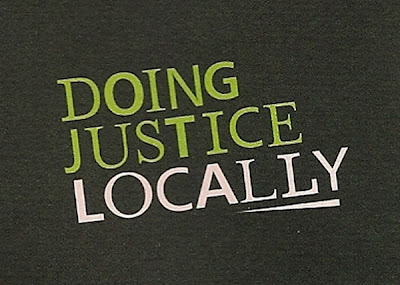
Neighbourhood Justice Centre Newsletter - Intentional or Accidental?
Received the Neighbourhood Justice Centre newsletter in the post recently.
They seem to like to highlight words with colours/bolding to reflect words within words (very tricky). Eg. NEIGHBOURHOOD JUSTICE CENTRE
But take a look at the words in the bottom right corner! Very interesting, especially considering they are here to help people with drug issues.
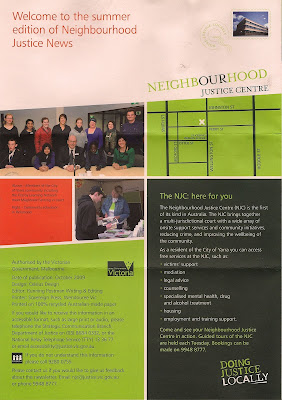
And a zoom in for you, if it is too small for you.
They seem to like to highlight words with colours/bolding to reflect words within words (very tricky). Eg. NEIGHBOURHOOD JUSTICE CENTRE
But take a look at the words in the bottom right corner! Very interesting, especially considering they are here to help people with drug issues.

And a zoom in for you, if it is too small for you.

Friday, August 07, 2009
My ANZ Business Banking Experience
Don't get me wrong, I love ANZ.
I feel they have one of the best 'feels' about them - with their new branches, user-friendly forms, website, iPhone Internet Banking and so on.
But in signing up for a Business Account, I encountered a sub-par experience.
After signing up at ANZ.com, I received an email confirmation which told me exactly what was required to be brought in. When I made my way into the 293 Collins St (Melbourne) Business Branch to finalise the account, the Customer Service Representative in Booth 19 told me these requirements were wrong. He ended up being wrong. He sent me away and said I needed a Business Name Registration certificate to open a Business Account under a Sole Trader name. So I went away and queried it with my initial Customer Service Representative, who put it in writing for me that the Representative in Booth 19 was wrong, and that he should call him, or speak with his Manager if any further problems were encountered.
So I traipsed back into the Collins Street Branch, and the next teller (Booth 20) also told me the same as Mr. Booth 19 (I believe she was the one who informed Mr. Booth 19 initially). But after showing her the email correspondence she fumbled her way through setting up an account.
And in the process, complained to me about how she was screwed around the other day when signing up at another organisation for an account. Oh, the irony.
And then when depositing a cheque, the teller proceeded to deposit more into my account than what the cheque stated. I let them know, and they soon fixed it up.
If only there were a way to bill companies for wasting customer's time.
But it is all setup now, and I will happily continue to use the banking service of ANZ. Giving them the benefit of the doubt for this one-off, sub-par customer service experience.
I feel they have one of the best 'feels' about them - with their new branches, user-friendly forms, website, iPhone Internet Banking and so on.
But in signing up for a Business Account, I encountered a sub-par experience.
After signing up at ANZ.com, I received an email confirmation which told me exactly what was required to be brought in. When I made my way into the 293 Collins St (Melbourne) Business Branch to finalise the account, the Customer Service Representative in Booth 19 told me these requirements were wrong. He ended up being wrong. He sent me away and said I needed a Business Name Registration certificate to open a Business Account under a Sole Trader name. So I went away and queried it with my initial Customer Service Representative, who put it in writing for me that the Representative in Booth 19 was wrong, and that he should call him, or speak with his Manager if any further problems were encountered.
So I traipsed back into the Collins Street Branch, and the next teller (Booth 20) also told me the same as Mr. Booth 19 (I believe she was the one who informed Mr. Booth 19 initially). But after showing her the email correspondence she fumbled her way through setting up an account.
And in the process, complained to me about how she was screwed around the other day when signing up at another organisation for an account. Oh, the irony.
And then when depositing a cheque, the teller proceeded to deposit more into my account than what the cheque stated. I let them know, and they soon fixed it up.
If only there were a way to bill companies for wasting customer's time.
But it is all setup now, and I will happily continue to use the banking service of ANZ. Giving them the benefit of the doubt for this one-off, sub-par customer service experience.
Thursday, July 23, 2009

Wednesday, July 08, 2009
Google Fails Year 6 Maths!
When researching the Google AdWords content network, I came across the following sum on the AdWords Help page.


Now, remembering back to primary school maths class, there is an acronym called BODMAS, that helps us to work out such sums. (Which stands for Brackets, Order, Division, Multiplication, Addition, Subtraction. And is the order in which things should be calculated, to arrive at the answer.)
And when BODMAS is applied to the sum above, the answer is $1.17 (and not $0.48, as listed).
But credit be given to them, as they do list in words how they work out the answer, which is the main thing at the end of the day. I just thought this was a bit of fun.
http://adwords.google.com/support/bin/answer.py?hl=en&answer=94661
http://www.easymaths.com/What_on_earth_is_Bodmas.htm
http://www.mathsphere.co.uk/resources/Year6Bodmas.htm

Now, remembering back to primary school maths class, there is an acronym called BODMAS, that helps us to work out such sums. (Which stands for Brackets, Order, Division, Multiplication, Addition, Subtraction. And is the order in which things should be calculated, to arrive at the answer.)
And when BODMAS is applied to the sum above, the answer is $1.17 (and not $0.48, as listed).
But credit be given to them, as they do list in words how they work out the answer, which is the main thing at the end of the day. I just thought this was a bit of fun.
http://adwords.google.com/support/bin/answer.py?hl=en&answer=94661
http://www.easymaths.com/What_on_earth_is_Bodmas.htm
http://www.mathsphere.co.uk/resources/Year6Bodmas.htm
Thursday, May 21, 2009
Interested in Human Behaviour, Psychology and Marketing?
Then you may like to follow my new Human Behaviour, Psychology and Marketing Blog.
Thursday, May 14, 2009

Friday, April 17, 2009
Ego Morphing
"The Marlboro Man. The ads caused consumers to switch brands because it was suggested they'd take on similar rugged traits."
Source: http://twitter.com/DrewEricWhitman
Source: http://twitter.com/DrewEricWhitman
Friday, April 03, 2009
Are people now marketing within CAPTCHA codes?
Below is a snapshot of a recent CAPTCHA code that came up.

I'm unsure exactly what the '3' is for, but you get the idea.
This does however highlight the potential of using CAPTCHA codes for advertising or branding. eg. 'TrustRAA' could be one for the South Australian based users (a local advertising strap line for the Royal Automobile Association line of insurance products). Or 'VisitMelbourne' for the international 'visitmelbourne.com' campaign, for example. Or even 'BrinksterFreeHosting', to let people know about Brinkster's free web hosting (with no ads).
Disclaimer: There may need to be other random characters inserted within the CAPTCHA to ensure bots do not guess potential popular phrases (and thus defeat the original purpose of the CAPTCHA code verification).

I'm unsure exactly what the '3' is for, but you get the idea.
This does however highlight the potential of using CAPTCHA codes for advertising or branding. eg. 'TrustRAA' could be one for the South Australian based users (a local advertising strap line for the Royal Automobile Association line of insurance products). Or 'VisitMelbourne' for the international 'visitmelbourne.com' campaign, for example. Or even 'BrinksterFreeHosting', to let people know about Brinkster's free web hosting (with no ads).
Disclaimer: There may need to be other random characters inserted within the CAPTCHA to ensure bots do not guess potential popular phrases (and thus defeat the original purpose of the CAPTCHA code verification).
Monday, March 23, 2009
Realtime comments on websites
Wow, was just on a retail website, and expected to be able to realtime comment on it (ala Twitter style*). LOL
The website was http://www.three.com.au/INQ and I just wanted to make the note that;
1. Twitter is where it's at now, and
2. The technology provided on the Three INQ is not that special, considering websites such as friendfeed.com and iPhone applications such as Fex that do the same thing. But, always good to be able to market a cool application that is simple to use.
*Meaning that I felt like I should be able to respond as if I were having a (Twitter) conversation with them. And for all users to be able to view other's comments.
The website was http://www.three.com.au/INQ and I just wanted to make the note that;
1. Twitter is where it's at now, and
2. The technology provided on the Three INQ is not that special, considering websites such as friendfeed.com and iPhone applications such as Fex that do the same thing. But, always good to be able to market a cool application that is simple to use.
*Meaning that I felt like I should be able to respond as if I were having a (Twitter) conversation with them. And for all users to be able to view other's comments.
Wednesday, March 18, 2009
Friday, March 06, 2009
Are you more likely to spend more when purchasing online?
Does anyone else find that they may spend more online than in a physical store?
I noticed I have just done this recently - when placing an order for books online. Amazon.com and other sites (such as BookDepository.co.uk) provide books for a lot cheaper than retail, so this makes it easier for a start.
But is it only the cost-effectiveness? Or can it also be contributed to the use of non-physical (electronic) money?
I know in poker the use of poker 'chips' is used, as opposed to 'physical' money. One reason for this is that users are less attached to chips than wads of cash. And thus more likely to gamble more.
I am fascinated by this concept.
Take a look at books online for 'Why We Buy' (Amazon.com)
---
My scenario: I spent a lot more than I would have in a physical book store, and also purchased a sole book from a separate site, for roughly what I may have over here in a physical store, when including postage (although not available over here in physical store). Perhaps it is also that I have been engaged with the site for some time - with my goal being to purchase these books from this site - and then human behaviour dictates that I follow through with my goal. Another factor could also be that when purchasing books online (and especially from overseas, for Australian users) is that one may purchase more items in one bulk order, to make postage costs work out effectively lower per item.
Another similar example is how making things easy for customers can increase sales substantially. Take for example Apple's app store. Customers have pre-entered their credit card details, so only have to use a simple once click process to make these small app purchases (plus enter their password in a popup window - a seemingly 'nothing' thing). If users had to enter their full contact and credit card details each time, sales would be overwhelmingly lower. Of note, is that Apple has created a model for this to be used, however this may not be applicable for all businesses.
I noticed I have just done this recently - when placing an order for books online. Amazon.com and other sites (such as BookDepository.co.uk) provide books for a lot cheaper than retail, so this makes it easier for a start.
But is it only the cost-effectiveness? Or can it also be contributed to the use of non-physical (electronic) money?
I know in poker the use of poker 'chips' is used, as opposed to 'physical' money. One reason for this is that users are less attached to chips than wads of cash. And thus more likely to gamble more.
I am fascinated by this concept.
Take a look at books online for 'Why We Buy' (Amazon.com)
---
My scenario: I spent a lot more than I would have in a physical book store, and also purchased a sole book from a separate site, for roughly what I may have over here in a physical store, when including postage (although not available over here in physical store). Perhaps it is also that I have been engaged with the site for some time - with my goal being to purchase these books from this site - and then human behaviour dictates that I follow through with my goal. Another factor could also be that when purchasing books online (and especially from overseas, for Australian users) is that one may purchase more items in one bulk order, to make postage costs work out effectively lower per item.
Another similar example is how making things easy for customers can increase sales substantially. Take for example Apple's app store. Customers have pre-entered their credit card details, so only have to use a simple once click process to make these small app purchases (plus enter their password in a popup window - a seemingly 'nothing' thing). If users had to enter their full contact and credit card details each time, sales would be overwhelmingly lower. Of note, is that Apple has created a model for this to be used, however this may not be applicable for all businesses.
Monday, August 25, 2008

Thursday, August 14, 2008
Good design has this effect
"He said overseas research suggested iPhone users conducted 50 times more Google searches than other phone users."
www.theage.com.au/news/technology/debt-fears-for-users-of-webphones/2008/08/14/1218307070117.html
www.theage.com.au/news/technology/debt-fears-for-users-of-webphones/2008/08/14/1218307070117.html
Tuesday, April 29, 2008
Monday, November 19, 2007
Windscreen wiper cooling techniques

Subscribe to:
Posts (Atom)